editing chat

Status
Not open for further replies.

u40

New User
Sep 7, 2021
3
24
anyone knows how to add colors to chat commands like !he !kevlar and all that stuff?
Saw people who had different colors in their commands when they typed them in chat.
 
Having colour codes before the command doesn't work. The only option I see is to execute the command and the msg separately.
Code:
sm_settings;say {red}!settings

bind f1 sm_settings;say {red}!settings
 
  • Like
Reactions: u40
*Ahem*
1634582439105.png

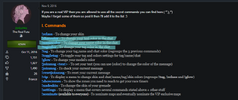
or just simply type /vip in-game chat and select Chat Options
or uh yeah, do what Jan said if that's what you really meant xd
 
Last edited:
  • Like
Reactions: Jan and u40
*Ahem*
View attachment 1419

or just simply type /vip in-game chat and select Chat Options
or uh yeah, do what Jan said if that's what you really meant xd
So they were referring to different colors. So being VIP you can only have one static color to chat and then use commands. If you want a rainbow color chat binds for weapon buys, you would need to use the method mentioned above.
U LOST THIS BATTLE UWU. 1-0 TO JAN

 
  • Haha
  • Like
Reactions: u40 and uwu police
Status
Not open for further replies.