Charon IV User Oct 11, 2021 21 26 Oct 11, 2021 #1 I bought the vip and would like some help on how to open the console
Glacius Verglas The Frosty One Oct 11, 2016 823 34 Oct 11, 2021 #2 You need to connect your Steam account to your forum account here; Connected Accounts After that, you will have your VIP in-game when you connect to any of our servers. There is no need to use the console in-game unless the server is full. Reactions: Charon IV
You need to connect your Steam account to your forum account here; Connected Accounts After that, you will have your VIP in-game when you connect to any of our servers. There is no need to use the console in-game unless the server is full.
Glacius Verglas The Frosty One Oct 11, 2016 823 34 Oct 11, 2021 #4 I see that the VIP is active for you. Feel free to check all our VIP commands at; VIP Benefits Reactions: Charon IV
Charon IV User Oct 11, 2021 21 26 Oct 11, 2021 #5 Glacius said: I see that the VIP is active for you. Feel free to check all our VIP commands at; VIP Benefits Click to expand... SORRY FOR THE TROUBLE BUT HOW DO I OPEN THE CONSOLE ? IT GIVES ME A STRANGE SYMBOL THAT I DON'T HAVE IT ON THE KEYBOARD
Glacius said: I see that the VIP is active for you. Feel free to check all our VIP commands at; VIP Benefits Click to expand... SORRY FOR THE TROUBLE BUT HOW DO I OPEN THE CONSOLE ? IT GIVES ME A STRANGE SYMBOL THAT I DON'T HAVE IT ON THE KEYBOARD
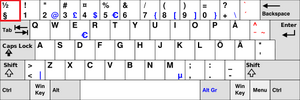
Glacius Verglas The Frosty One Oct 11, 2016 823 34 Oct 11, 2021 #6 If the ~ key doesn't work, try pressing the button above TAB -key. The one that makes this; "§"
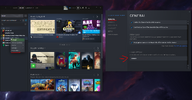
Glacius Verglas The Frosty One Oct 11, 2016 823 34 Oct 11, 2021 #7 If it still does not work, you need to go to Options -> Keyboard -> Advanced and then tick "Enable developer console".
If it still does not work, you need to go to Options -> Keyboard -> Advanced and then tick "Enable developer console".
Jan Permanent Admin Jul 15, 2019 299 Oct 11, 2021 #8 Charon IV said: SORRY FOR THE TROUBLE BUT HOW DO I OPEN THE CONSOLE ? IT GIVES ME A STRANGE SYMBOL THAT I DON'T HAVE IT ON THE KEYBOARD Click to expand... Follow what Glacius said above. After that write this in Launch Options Code: -console After you get console up, then Code: bind "your desired key" "toggleconsole" As an example I have mine as bind "-" "toggleconsole" Reactions: Charon IV
Charon IV said: SORRY FOR THE TROUBLE BUT HOW DO I OPEN THE CONSOLE ? IT GIVES ME A STRANGE SYMBOL THAT I DON'T HAVE IT ON THE KEYBOARD Click to expand... Follow what Glacius said above. After that write this in Launch Options Code: -console After you get console up, then Code: bind "your desired key" "toggleconsole" As an example I have mine as bind "-" "toggleconsole"